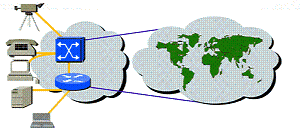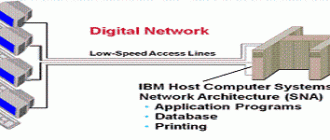
In the previous section, we discussed how networking evolved and some of the problems involved in the transmission of data such as conflict and multiple terminals. In this section some of the basic elements needed to build local area networks (LANs) will be described.
LAN(Local Area Network)
The term local-area network, or LAN, describes of all the devices that communicate together—printers, file server, computers, and perhaps even a host computer. However, the LAN is constrained by distance. The transmission technologies used in LAN applications do not operate at speed over long distances. LAN distances are in the range of 100 meters (m) to 3 kilometers (km). This range can change as new technologies emerge.
For systems from different manufacturers to interoperate—be it a printer, PC, and file server—they must be developed and manufactured according to industry-wide protocols and standards.
More details about protocols and standards will be given later, but for now, just keep in mind they represent rules that govern how devices on a network exchange information. These rules are developed by industry-wide special interest groups (SIGs) and standards committees such as the Institute of Electrical and Electronics Engineers (IEEE).
Most of the network administrator’s tasks deal with LANs. Major characteristics of LANs are:
– The network operates within a building or floor of a building. The geographic scope for ever more powerful LAN desktop devices running more powerful applications is for less area per LAN.
– LANs provide multiple connected desktop devices (usually PCs) with access to high-bandwidth media.
– An enterprise purchases the media and connections used in the LAN; the enterprise can privately control the LAN as it chooses.
– LANs rarely shut down or restrict access to connected workstations; local services are usually always available.
– By definition, the LAN connects physically adjacent devices on the media.
So let’s look at the components of a LAN.
Components of LAN
– Network operating system(NOS)
In order for computers to be able to communicate with each other, they must first have the networking software that tells them how to do so. Without the software, the system will function simply as a “standalone,” unable to utilize any of the resources on the network.
Network operating software may by installed by the factory, eliminating the need for you to purchase it, (for example AppleTalk), or you may install it yourself.
– Network interface card(NIC)
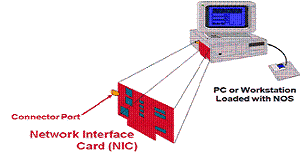
In addition to network operating software, each network device must also have a network interface card. These cards today are also referred to as adapters, as in “Ethernet adapter card” or “Token Ring adapter card.”
The NIC card amplifies electronic signals which are generally very weak within the computer system itself. The NIC is also responsible for packaging data for transmission, and for controlling access to the network cable. When the data is packaged properly, and the timing is right, the NIC will push the data stream onto the cable.
The NIC also provides the physical connection between the computer and the transmission cable (also called “media”). This connection is made through the connector port. Examples of transmission media are Ethernet, Token Ring, and FDDI.
– Writing Hub
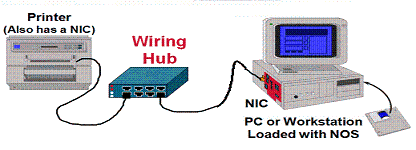
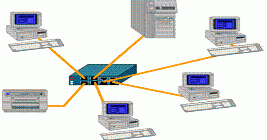
In order to have a network, you must have at least two devices that communicate with each other. In this simple model, it is a computer and a printer. The printer also has an NIC installed (for example, an HP Jet Direct card), which in turn is plugged into a wiring hub. The computer system is also plugged into the hub, which facilitates communication between the two devices.
Additional components (such as a server, a few more PCs, and a scanner) may be connected to the hub. With this connection, all network components would have access to all other network components.
The benefit of building this network is that by sharing resources a company can afford higher quality components. For example, instead of providing an inkjet printer for every PC, a company may purchase a laser printer (which is faster, higher capacity, and higher quality than the inkjet) to attach to a network. Then, all computers on that network have access to the higher quality printer.
– Cables or Transmission Media
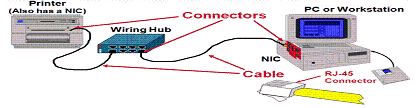
The wires connecting the various devices together are referred to as cables.
– Cable prices range from inexpensive to very costly and can comprise of a significant cost of the network itself.
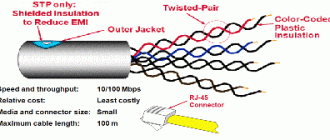
– Cables are one example of transmission media. Media are various physical environments through which transmission signals pass. Common network media include twisted-pair, coaxial cable, fiber-optic cable, and the atmosphere (through which microwave, laser, and infrared transmission occurs). Another term for this is “physical media.” *Note that not all wiring hubs support all medium types.
The other component shown in this fig1. is the connector.
– As their name implies, the connector is the physical location where the NIC card and the cabling connect.
– Registered jack (RJ) connectors were originally used to connect telephone lines. RJ connectors are now used for telephone connections and for 10BaseT and other types of network connections. Different connectors are able support different speeds of transmission because of their design and the materials used in their manufacture.
– RJ-11 connectors are used for telephones, faxes, and modems. RJ-45 connectors are used for NIC cards, 10BaseT cabling, and ISDN lines.