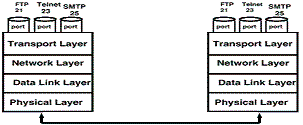
– Application layer
- – File Transfer Protocol (FTP)
- – Remote Login (Telnet)
- – E-mail (SMTP)
– Transport layer
- – Transport Control Protocol (TCP)
- – User Datagram Protocol (UDP)
– Network layer
- – Internet Protocol (IP)
– Data link & physical layer
- – LAN Ethernet, Token Ring, FDDI, etc.
- – WAN Serial lines, Frame Relay, X.25, etc.
Roughly, Ethernet corresponds to both the physical layer and the data link layer. Other media (T1, Frame Relay, ATM, ISDN, analog) and other protocols (SLIP, PPP) are down here as well. Roughly, IP corresponds to the network layer. Roughly, TCP and UDP correspond to the transport layer.
TCP is the most important of all the IP protocols. Most Internet applications you can think of use TCP, including: Telnet, HTTP (Web), POP & SMTP (email) and FTP (file transfer).
TCP Transmission Control Protocol
TCP stands for Transmission Control Protocol.
TCP establishes a reliable connection between two applications over the network. This means that TCP guarantees accurate, sequential delivery of your data. If something goes wrong, TCP reports an error, so you always know whether your data arrived at the other end.
Here’s how it works:
Every TCP connection is uniquely identified by four numbers:
- – source IP address
- – source port
- – destination IP address
- – destination port
Typically, a client will use a random port number, but a server will use a “well known” port number, e.g. 25=SMTP (email), 80=HTTP (Web) and so on. Because every TCP connection is unique, even though many people may be making requests to the same Web server, TCP/IP can identify your packets among the crowd.
In addition to the port information, each TCP packet has a sequence number. Packets may arrive out of sequence (they may have been routed differently, or one may have been dropped), so the sequence numbers allow TCP to reassemble the packets in the correct order and to request retransmission of any missing packets.
TCP packets also include a checksum to verify the integrity of the data. Packets that fail checksum get retransmitted.
TCP establishes a reliable connection between two applications over the network. This means that TCP guarantees accurate, sequential delivery of your data. If something goes wrong, TCP reports an error, so you always know whether your data arrived at the other end.
Here’s how it works:
Every TCP connection is uniquely identified by four numbers:
- – source IP address
- – source port
- – destination IP address
- – destination port
Typically, a client will use a random port number, but a server will use a “well known” port number, e.g. 25=SMTP (email), 80=HTTP (Web) and so on. Because every TCP connection is unique, even though many people may be making requests to the same Web server, TCP/IP can identify your packets among the crowd.
In addition to the port information, each TCP packet has a sequence number. Packets may arrive out of sequence (they may have been routed differently, or one may have been dropped), so the sequence numbers allow TCP to reassemble the packets in the correct order and to request retransmission of any missing packets.
TCP packets also include a checksum to verify the integrity of the data. Packets that fail checksum get retransmitted.
UDP User Datagram Protocol
- – Unreliable
- – Fast
- – Assumes application will retransmit on error
- – Often used in diskless workstations
UDP is a fast, unreliable protocol that is suitable for some applications.
Unreliable means there is no sequencing, no guaranteed delivery (no automatic retransmission of lost packets) and sometimes no checksums.
Fast means there is no connection setup time, unlike TCP. In reality, once a TCP session is established, packets will go just as fast over a TCP connection as over UDP.
UDP is useful for applications such as streaming audio that don’t care about dropped packets and for applications such as TFTP that inherently do their own sequencing and checksums. Also, applications such as NFS that usually run on very reliable physical networks and which need fast, connectionless transactions use UDP.
ICMP Ping
Ping is an example of a program that uses ICMP rather than TCP or UDP. Ping sends an ICMP echo request from one system to another, then waits for an ICMP echo reply. It is mostly used for testing.