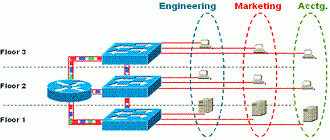
Another key component of VLANs is the router. Routers provide inter-VLAN communications and are essential for sharing VLAN information in large environments. The Layer 3 routing capabilities provide additional security between networks (access lists, protocol filtering, and so on).
In general, there are two approaches to using routers as communication points for VLANs:
– Logical connection method— Using ISL within the router, a trunk can be established between the switch and the router. One high- speed port is used, and multiple VLAN information runs across this trunk link. (We’ll explain ISL in just a minute.)
– Physical connection method— Multiple independent links are used between the router and the switch. Each link contains its own VLAN. This scenario does not require ISL to be implemented on the router and also allows lower-speed links to be used.
The proper method to implement depends on the customer’s needs and requirements. (Does the customer need to conserve router and switch ports? Does the customer need a high-speed ISL port?) In both instances, the router still supports inter-VLAN communication.
Server Connectivity
The network server is another key component of VLANs. Servers provide file, print, and storage services to users throughout the network regardless of VLANs.
To optimize their network environments many customers deploy centralized server farms in their networks.
This eases administration of the servers and Network Operating System, or NOS, significantly. These server farms contain servers that support the entire network, but each server supports a specific VLAN or number of VLANs.
As in the use of routers within VLANs, there are two approaches to using servers as common access within a VLAN environment:
Logical connection method
Using a server adapter (NIC) running ISL, a trunk can be established between the switch and the server. One high-speed port is used and information for multiple VLANs runs across this trunk link. This method offers greater flexibility as well as a high-performance solution that is easy to administer. (that is one NIC to setup and monitor). Note: ISL is now supported in several vendors’ server NIC cards: Intel, CrossPoint. These adapters support up to 64 VLANs per port and cost approximately US$500.
Physical Connection method
Multiple independent links are used between the server and the switch. Each link contains its own VLAN. This method does not require ISL to be implemented on the server and also allows lower-speed links to be used.
The proper method to implement depends on the customer’s needs and requirements. (Does the customer need to conserve switch ports? Does the customer need a high-speed ISL port? Does the customer want to use ISL server adapters?) In both methods, the server still supports multiple VLANs.