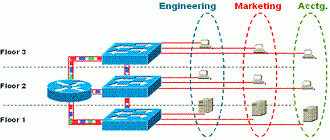
In addition to the ISL packet tagging method, Cisco also created the Virtual Trunking Protocol, or VTP, for dynamically configuring VLAN information across the network regardless of media type (for example Fast Ethernet, ATM, FDDI, and so on).
This VTP protocol is the software that makes ISL usable.
VTP enables VLAN communication from a centralized network management platform, thus minimizing the amount of administration that is required when adding or changing VLANs anywhere within the network. VTP completely eliminates the need to administer VLANs on a per-switch basis, an essential characteristic as the number of a network’s switches and VLANs grows and reaches a point where changes can no longer be reliably administered on individual components. VTP allows for greater scalability because it eliminates complex VLAN administration tasks across every switch.
Conceptually, VTP works like this: When you add a new VLAN to the network, let’s say VLAN 1, VTP automatically goes out and configures the trunk interfaces across the backbone for that VLAN. This includes the mapping of ISL to LANE or to 802.1Q.
Adding a second VLAN is just as easy. VTP sends out new advertisements and maps the VLAN across the appropriate interfaces. The important thing to remember about this second VLAN, is that VTP keeps track of the VLANs that already exist and eliminates any cross configurations between these two, especially if this configuration were to be done manually.
– Summary –
- VLANs enable logical (instead of physical) groups of users on a switch
- VLANs address the needs for mobility and flexibility
- VLANs reduce administrative overhead, improve security, and provide more efficient bandwidth utilization